
As your needs evolve and your business expands, upgrading your subscription tier can unlock additional features and a cheaper revenue share (cost per transaction). Whether you're seeking greater flexibility or advanced functionalities, upgrading your plan is a seamless process.
How to upgrade your plan:
-
Research the right plan for your needs.
-
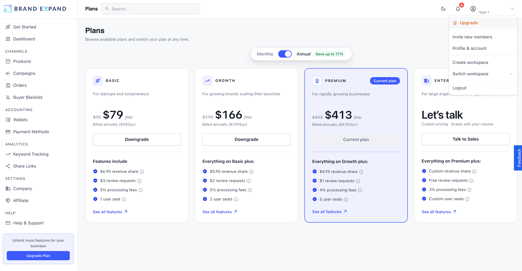
Login and click "Upgrade" in the upper right corner of your dashboard.
-
Click "Upgrade" or "Downgrade" to the desired monthly or annual plan.
Interested in a custom Enterpriser plan? Contact us by chat or email so we can put together your custom offer.

Note: If you recently paid for your previous subscription plan, the system will prorate the amount owed for the upgrade, ensuring you're charged fairly based on the remaining time of your current plan.
Subscription downgrades will take effect at the beginning of your current plan's next billing cycle.
Also, please remember that all our plans require a 1-year commitment, even if you choose to pay monthly.
If you're unsure which plan to subscribe to, you can check all the details here.